Connect the tools you already use
Link business applications, spreadsheets and databases through built-in connectors or APIs so information can flow between them.
 SolutionsBusiness technology, made useful.← Back to services
Automation/Integration
We use n8n, Microsoft Power Automate or custom-developed apps to connect your business systems. We can automate data transfers and routine tasks, so your team spends less time entering the same information in multiple places.
Link business applications, spreadsheets and databases through built-in connectors or APIs so information can flow between them.
Set up scheduled data transfers, send notifications when records change or route requests to the right person for approval.
Build in checks and alerts so your team can spot missing data, see when a transfer fails and know when to step in.
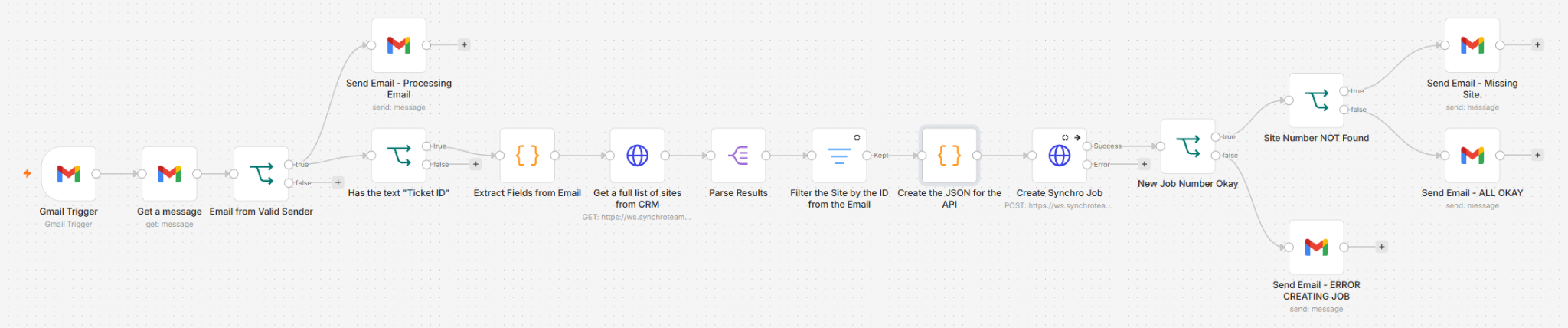
When a new order arrives by email, the workflow reads the order details, finds the correct customer and site, and creates a record in the CRM. It sends an email if the site cannot be found or the record cannot be created.
When a new task is entered in the CRM, the workflow creates a corresponding task in the subcontractor’s own CAFM system so their team can action it.
When a product is created in the CRM, the workflow takes the next available number from the barcode list file, adds the EAN-13 check digit and provides both the 13-digit barcode value and a scannable barcode image.
When a new order is placed in Shopify, the workflow retrieves the order details and creates a sales order in SAP.